


















As per IDC, Forrester and other research groups, continuous full and incremental data backups is a must to attain few seconds of RPO and under 10 minutes RTO. To mitigate risks due to unforeseen circumstances or human/machine errors, the first task across all environments (poc, dev, qa, & prod) must be to back up both code and operational data. With SAP HANA being a cornerstone of many organizations' data infrastructure, reliable backup mechanisms are essential to protect against data loss and ensure business continuity. In addition to backup and restore, data backups are being leveraged by several small and large organizations for reporting and audit trail purposes.
SAP HANA Database Backup, Report & Restore
Trusted by Global Enterprises
0+Years Experience
0+Unique Customers
0+Solutions Delivered
ISO 27001Certified
SOC 2Type II Compliant
Vast Edge Backup Solution for SAP HANA
Vast Edge offers robust SAP HANA backup solutions to ensure the safety and integrity of customer’s critical data. Vast Edge employs advanced backup strategies tailored to the specific needs of SAP HANA environments, leveraging technologies such as snapshot-based backups, log backups, and automated backup scheduling. Our expert team designs comprehensive backup and recovery plans that consider factors like data volume, retention policies and compliance requirements (encryption in transit and at rest)
File-based vs. Backint: which is better for SAP HANA?
File-based backups are simple to set up and suitable for smaller environments, while Backint is better for enterprise use as it integrates with third-party tools, offering scalability, automation, and centralized management.
The Need for Data Backup
Leading Fortune 500 companies like Microsoft, Home Depot, JPMorgan Chase, Facebook, and Target have also fallen victim to some of the most significant data breaches in history. This highlights a widespread vulnerability across the corporate landscape, where virtually no large entity has remained untouched.
Over the past decade, the repercussions of inadequate cybersecurity measures have reverberated throughout the business world, resulting in staggering financial losses amounting to billions of dollars.
Moreover, these breaches have left consumers exposed to the risk of financial crimes, underscoring the urgent need for enhanced security protocols and proactive measures to safeguard sensitive data.
How to reduce SAP HANA backup time for large databases?
You can reduce backup time by enabling parallel backups, using high-performance storage, applying compression, and scheduling backups during low system usage to improve efficiency.
By partnering with Vast Edge for SAP HANA backup, businesses can mitigate risks, safeguard their data assets, and maintain uninterrupted operations, even in the face of unforeseen challenges or disasters.
SAP HANA ARCHITECTURE
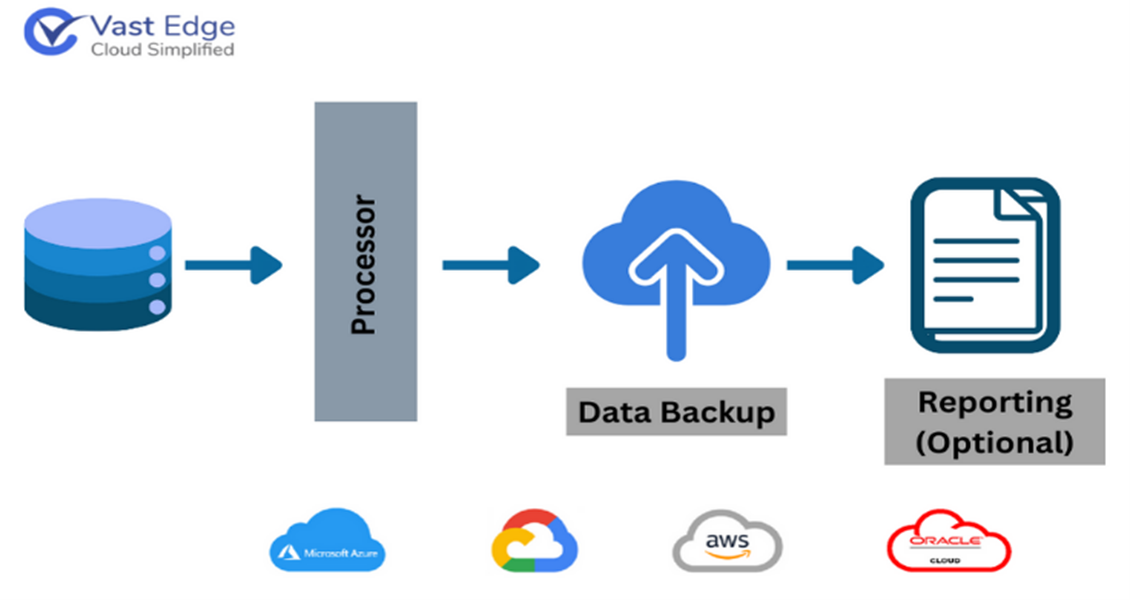
SAP HANA employs an innovative in-memory computing architecture, enabling lightning-fast data processing and real-time analytics.
Why is my SAP HANA log backup not truncating?
This usually happens due to misconfigured log backup settings, disabled scheduling, or issues with the backup destination. It can also occur if log backups are not completing successfully or if the system is still retaining logs for recovery purposes.
What are the SAP HANA backup requirements for GDPR?
GDPR requires secure storage, encryption, controlled access, and defined retention policies for backups. Regular testing and audit readiness are also important to ensure data protection compliance.
How to encrypt SAP HANA backups at rest?
SAP HANA provides native encryption features to secure backups at rest. You can enable encryption in the system settings or use external tools for additional security and compliance requirements.
Vast Edge offers a complimentary demo environment to test our solution. If you're interested in experiencing our demo, please schedule a meeting with one of our Vast Edge experts by clicking on this Microsoft Booking link. This 20-minute session will feature a live demonstration of our Vast Edge SAP HANA backup solution. Upon request, our personnel will provide personalized login credentials for accessing the demo environment.
Loading...
FEATURED BY
Google Cloud
Vast Edge's live recovery interface for cloud backups was highlighted by Google Cloud.
Vast Edge, built on GCP, launches the first live recovery interface for cloud backups, enabling IT teams to inspect, search, preview and validate the exact data available for restore.
Google Cloud
Jul 27 – Jul 31
•
Vast Edge, built on GCP, launches the first live recovery interface for cloud backups, enabling IT teams to inspect backup contents in real time. This transforms backups from a blind, log-based process into an interactive platform where teams can instantly search, preview, and validate the exact data available for restore.
This platform protects Google Workspace, NetSuite, Salesforce, Workday and many SaaS environments, providing complete visibility and enterprise-grade oversight.
Visit Vast Edge Backup & Disaster Recovery and get a free trial of their backup solutions on the GCP Marketplace for Google Workspace Backup, NetSuite Backup, Salesforce Backup, and Workday Backup.
Search
Find your data instantly
Preview
View before you restore
Validate
Ensure the right data
Recover
Restore with confidence