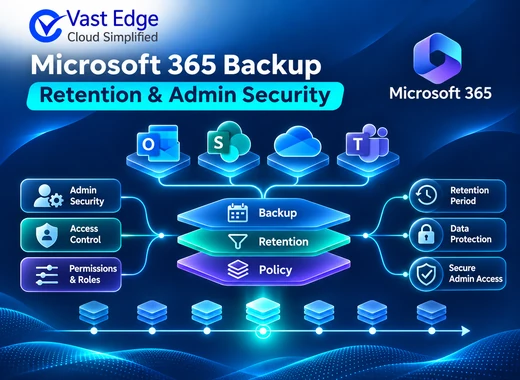
A sound Microsoft 365 backup policy separates retention decisions from administrator access. Define the required recovery window by workload and incident, assign the least-privileged backup roles, use a second reviewer for destructive changes, enable notifications, review activity and Purview audit records, and test offboarding. Document exceptions because retention, deletion and backup policies do not behave as one control.
How Should You Set Microsoft 365 Backup Retention and Admin Security?
PublishedNov 24, 2026
C
AuthorChloe Gallagher
Why are retention and backup different controls?
Why are retention and backup different controls? Begin with live Microsoft 365 retention and deletion rules, backup policy recovery points, restore use cases and policy ownership. Define the business event, the authoritative record and the person responsible for the outcome. A feature label is not an acceptance standard. The procedure must explain what is expected, what evidence proves completion and which condition requires escalation.
Create a normal path and an exception path for live Microsoft 365 retention and deletion rules, backup policy recovery points, restore use cases and policy ownership. Use unique identifiers, timestamps and reason codes so another reviewer can reconstruct the action. Where a decision can change inventory, access or recoverable data, require an approved owner and preserve the before-and-after state.
Test live Microsoft 365 retention and deletion rules, backup policy recovery points, restore use cases and policy ownership with representative data and least-privilege roles. Include a partial transaction, invalid input, duplicate attempt and delayed dependency. Compare the final business result with operational logs, then classify each gap as data, configuration, process, integration, permission or product scope.
Add live Microsoft 365 retention and deletion rules, backup policy recovery points, restore use cases and policy ownership to the operating review. Track recurring failures, the oldest unresolved exception and corrective actions. A successful test should be repeatable by the assigned team, not dependent on an undocumented workaround or one administrator’s memory.
| Control | Purpose | Evidence |
|---|---|---|
| Recovery window | Match available history to business need | Approved policy and start date |
| Least-privilege role | Limit backup and restore authority | Role review and access record |
| Activity and audit review | Detect and investigate changes | Exported activity plus Purview audit |
How should recovery windows be selected?
How should recovery windows be selected? Begin with legal and operational needs, workload coverage, policy start date, 3-month, 6-month, 1-year or 2-year windows and accumulated history. Define the business event, the authoritative record and the person responsible for the outcome. A feature label is not an acceptance standard. The procedure must explain what is expected, what evidence proves completion and which condition requires escalation.
Create a normal path and an exception path for legal and operational needs, workload coverage, policy start date, 3-month, 6-month, 1-year or 2-year windows and accumulated history. Use unique identifiers, timestamps and reason codes so another reviewer can reconstruct the action. Where a decision can change inventory, access or recoverable data, require an approved owner and preserve the before-and-after state.
Test legal and operational needs, workload coverage, policy start date, 3-month, 6-month, 1-year or 2-year windows and accumulated history with representative data and least-privilege roles. Include a partial transaction, invalid input, duplicate attempt and delayed dependency. Compare the final business result with operational logs, then classify each gap as data, configuration, process, integration, permission or product scope.
Add legal and operational needs, workload coverage, policy start date, 3-month, 6-month, 1-year or 2-year windows and accumulated history to the operating review. Track recurring failures, the oldest unresolved exception and corrective actions. A successful test should be repeatable by the assigned team, not dependent on an undocumented workaround or one administrator’s memory.
Which administrator roles should manage backup?
Which administrator roles should manage backup? Begin with Global, SharePoint, Exchange, Microsoft 365 Backup and workload-specific backup roles with least privilege and emergency access. Define the business event, the authoritative record and the person responsible for the outcome. A feature label is not an acceptance standard. The procedure must explain what is expected, what evidence proves completion and which condition requires escalation.
Create a normal path and an exception path for Global, SharePoint, Exchange, Microsoft 365 Backup and workload-specific backup roles with least privilege and emergency access. Use unique identifiers, timestamps and reason codes so another reviewer can reconstruct the action. Where a decision can change inventory, access or recoverable data, require an approved owner and preserve the before-and-after state.
Test Global, SharePoint, Exchange, Microsoft 365 Backup and workload-specific backup roles with least privilege and emergency access with representative data and least-privilege roles. Include a partial transaction, invalid input, duplicate attempt and delayed dependency. Compare the final business result with operational logs, then classify each gap as data, configuration, process, integration, permission or product scope.
Add Global, SharePoint, Exchange, Microsoft 365 Backup and workload-specific backup roles with least privilege and emergency access to the operating review. Track recurring failures, the oldest unresolved exception and corrective actions. A successful test should be repeatable by the assigned team, not dependent on an undocumented workaround or one administrator’s memory.
Which changes need notification or second review?
Which changes need notification or second review? Begin with policy creation, pause, removal, controller changes, restore initiation, notification-list changes and harmful-event alerts. Define the business event, the authoritative record and the person responsible for the outcome. A feature label is not an acceptance standard. The procedure must explain what is expected, what evidence proves completion and which condition requires escalation.
Create a normal path and an exception path for policy creation, pause, removal, controller changes, restore initiation, notification-list changes and harmful-event alerts. Use unique identifiers, timestamps and reason codes so another reviewer can reconstruct the action. Where a decision can change inventory, access or recoverable data, require an approved owner and preserve the before-and-after state.
Test policy creation, pause, removal, controller changes, restore initiation, notification-list changes and harmful-event alerts with representative data and least-privilege roles. Include a partial transaction, invalid input, duplicate attempt and delayed dependency. Compare the final business result with operational logs, then classify each gap as data, configuration, process, integration, permission or product scope.
Add policy creation, pause, removal, controller changes, restore initiation, notification-list changes and harmful-event alerts to the operating review. Track recurring failures, the oldest unresolved exception and corrective actions. A successful test should be repeatable by the assigned team, not dependent on an undocumented workaround or one administrator’s memory.
What evidence should activity and audit logs provide?
What evidence should activity and audit logs provide? Begin with actor, time, workload, policy, protection unit, restore status, exported activity evidence and Purview audit investigation. Define the business event, the authoritative record and the person responsible for the outcome. A feature label is not an acceptance standard. The procedure must explain what is expected, what evidence proves completion and which condition requires escalation.
Create a normal path and an exception path for actor, time, workload, policy, protection unit, restore status, exported activity evidence and Purview audit investigation. Use unique identifiers, timestamps and reason codes so another reviewer can reconstruct the action. Where a decision can change inventory, access or recoverable data, require an approved owner and preserve the before-and-after state.
Test actor, time, workload, policy, protection unit, restore status, exported activity evidence and Purview audit investigation with representative data and least-privilege roles. Include a partial transaction, invalid input, duplicate attempt and delayed dependency. Compare the final business result with operational logs, then classify each gap as data, configuration, process, integration, permission or product scope.
Add actor, time, workload, policy, protection unit, restore status, exported activity evidence and Purview audit investigation to the operating review. Track recurring failures, the oldest unresolved exception and corrective actions. A successful test should be repeatable by the assigned team, not dependent on an undocumented workaround or one administrator’s memory.
For related context, review the Office 365 backup evaluation guide and backup and disaster recovery planning guide. These resources provide context and do not replace the topic-specific acceptance checks above.
How should offboarding and policy reduction be controlled?
How should offboarding and policy reduction be controlled? Begin with recovery-point expiry, grace periods, billing changes, protection-unit removal, approved owner, impact review and rollback options. Define the business event, the authoritative record and the person responsible for the outcome. A feature label is not an acceptance standard. The procedure must explain what is expected, what evidence proves completion and which condition requires escalation.
Create a normal path and an exception path for recovery-point expiry, grace periods, billing changes, protection-unit removal, approved owner, impact review and rollback options. Use unique identifiers, timestamps and reason codes so another reviewer can reconstruct the action. Where a decision can change inventory, access or recoverable data, require an approved owner and preserve the before-and-after state.
Test recovery-point expiry, grace periods, billing changes, protection-unit removal, approved owner, impact review and rollback options with representative data and least-privilege roles. Include a partial transaction, invalid input, duplicate attempt and delayed dependency. Compare the final business result with operational logs, then classify each gap as data, configuration, process, integration, permission or product scope.
Add recovery-point expiry, grace periods, billing changes, protection-unit removal, approved owner, impact review and rollback options to the operating review. Track recurring failures, the oldest unresolved exception and corrective actions. A successful test should be repeatable by the assigned team, not dependent on an undocumented workaround or one administrator’s memory.
What should the quarterly security review include?
What should the quarterly security review include? Begin with role membership, protected scope, failures, notifications, audit availability, test results, exceptions and approved risk. Define the business event, the authoritative record and the person responsible for the outcome. A feature label is not an acceptance standard. The procedure must explain what is expected, what evidence proves completion and which condition requires escalation.
Create a normal path and an exception path for role membership, protected scope, failures, notifications, audit availability, test results, exceptions and approved risk. Use unique identifiers, timestamps and reason codes so another reviewer can reconstruct the action. Where a decision can change inventory, access or recoverable data, require an approved owner and preserve the before-and-after state.
Test role membership, protected scope, failures, notifications, audit availability, test results, exceptions and approved risk with representative data and least-privilege roles. Include a partial transaction, invalid input, duplicate attempt and delayed dependency. Compare the final business result with operational logs, then classify each gap as data, configuration, process, integration, permission or product scope.
Add role membership, protected scope, failures, notifications, audit availability, test results, exceptions and approved risk to the operating review. Track recurring failures, the oldest unresolved exception and corrective actions. A successful test should be repeatable by the assigned team, not dependent on an undocumented workaround or one administrator’s memory.
Key Takeaways
- 01Start with a defined business outcome, authoritative record and accountable owner.
- 02Test both normal activity and difficult exceptions with representative data.
- 03Use measurable acceptance evidence and business-owner validation before closing the work.
- 04Record product limits and observed results without converting them into universal guarantees.
Explore the Relevant Vast Edge Solution
If your organization needs support applying these controls, review Vast Edge Microsoft 365 Backup. Use a discovery session to confirm supported scope, exclusions, administration and acceptance evidence before discussing implementation or service options.
Loading...
FEATURED BY
Google Cloud
Vast Edge's live recovery interface for cloud backups was highlighted by Google Cloud.
Vast Edge, built on GCP, launches the first live recovery interface for cloud backups, enabling IT teams to inspect, search, preview and validate the exact data available for restore.
Google Cloud
Jul 27 – Jul 31
•
Vast Edge, built on GCP, launches the first live recovery interface for cloud backups, enabling IT teams to inspect backup contents in real time. This transforms backups from a blind, log-based process into an interactive platform where teams can instantly search, preview, and validate the exact data available for restore.
This platform protects Google Workspace, NetSuite, Salesforce, Workday and many SaaS environments, providing complete visibility and enterprise-grade oversight.
Visit Vast Edge Backup & Disaster Recovery and get a free trial of their backup solutions on the GCP Marketplace for Google Workspace Backup, NetSuite Backup, Salesforce Backup, and Workday Backup.
Search
Find your data instantly
Preview
View before you restore
Validate
Ensure the right data
Recover
Restore with confidence